UPS Systems: A Complete Guide to Uninterruptible Power Supply Solutions
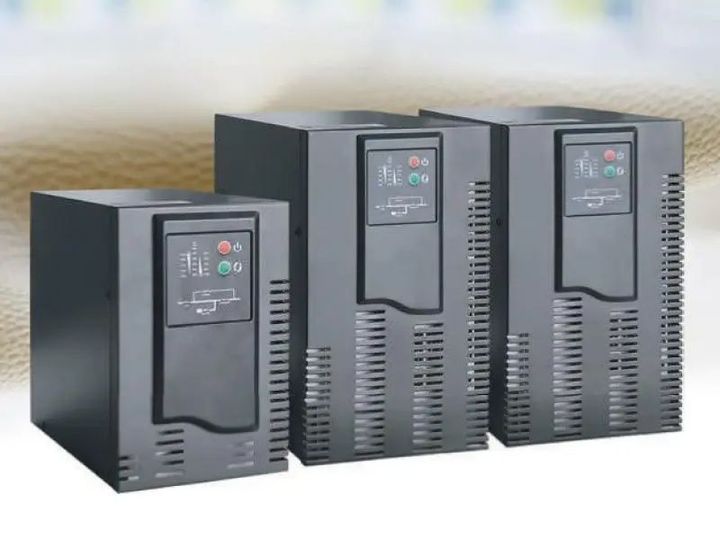
UPS systems are designed to provide continuous electrical power whenever the main power source becomes unstable or unavailable.
They help protect computers, networking equipment, medical devices, industrial machinery, and many other electronic systems from unexpected power interruptions.
Power outages, voltage fluctuations, and electrical disturbances can interrupt daily activities and damage sensitive equipment. Understanding how UPS systems work makes it easier to choose the right solution for different environments, from homes and offices to data centers and manufacturing facilities.
Quick Overview Table
| Topic | Purpose | Key Features / Components | Main Benefits | Common Applications |
|---|---|---|---|---|
| UPS Systems | Maintain uninterrupted power during electrical interruptions | Battery, inverter, rectifier, charger, voltage regulation, monitoring | Equipment protection, reliable operation, voltage stability, reduced downtime | Homes, offices, hospitals, data centers, factories, communication networks |
Understanding the Concept
A UPS system, or Uninterruptible Power Supply, is an electrical device that supplies backup power when the primary electricity source stops working or becomes unstable. Unlike a standard battery backup, a UPS responds almost instantly, allowing connected equipment to continue operating without interruption.
Modern UPS systems also improve power quality by regulating voltage and filtering electrical disturbances. This makes them valuable for environments where reliable electricity is essential for safety, productivity, and equipment protection.
As digital infrastructure continues to expand, UPS systems have become an important part of electrical planning in residential, commercial, healthcare, educational, and industrial settings.
Key Features or Core Components
The main components of a UPS system work together to maintain reliable power.
- Rechargeable battery for backup energy
- Inverter that converts stored energy into usable electricity
- Rectifier that charges the battery
- Automatic voltage regulation
- Surge protection
- Battery management system
- Cooling components
- Intelligent monitoring functions
- Input and output protection circuits
- Status indicators and alarm notifications
Main Types or Categories
Offline UPS Systems
Offline UPS systems are commonly used for personal computers and home electronics. During normal operation, electricity flows directly from the utility supply. When an outage occurs, the battery automatically provides temporary backup power.
Line-Interactive UPS Systems
Line-interactive UPS systems include automatic voltage regulation that corrects minor voltage changes without relying entirely on battery power. They are widely used in offices, networking environments, and small server rooms.
Online UPS Systems
Online UPS systems continuously power connected equipment through the inverter. Since equipment always receives conditioned electricity, these systems provide the highest level of protection for critical infrastructure such as hospitals, financial institutions, industrial automation, and data centers.
How It Works (Step-by-Step)
- The UPS receives electricity from the primary power source.
- The charging circuit keeps the internal battery fully charged.
- Connected equipment receives stable electrical power.
- If the incoming power becomes unstable or fails, the UPS detects the change immediately.
- The battery supplies stored energy to the inverter.
- The inverter converts battery energy into usable AC electricity.
- Once normal power returns, the UPS switches back automatically while recharging the battery.
Benefits and Advantages
UPS systems provide several important advantages in everyday and professional environments.
- Continuous power during outages
- Protection against voltage fluctuations
- Improved equipment reliability
- Reduced risk of unexpected shutdowns
- Better protection for sensitive electronics
- Stable electrical output
- Improved productivity
- Longer equipment lifespan through cleaner power
- Enhanced safety for critical operations
- Reliable support for digital infrastructure
Practical Usage Guide or Best Practices
Follow these practical steps to improve UPS performance.
- Select a UPS with sufficient power capacity for connected equipment.
- Place the unit in a cool, dry, and well-ventilated location.
- Test battery performance on a regular schedule.
- Avoid connecting equipment that exceeds the rated capacity.
- Replace aging batteries according to maintenance recommendations.
- Keep air vents clean to prevent overheating.
- Monitor system indicators for warnings or battery health updates.
Real-World Examples and Applications
Home Office
A UPS system keeps a computer, internet router, and monitor operating long enough to save important files and safely shut down equipment during an unexpected outage.
Healthcare Environment
Medical equipment often requires continuous electrical power. UPS systems help maintain operation while emergency generators become fully operational.
Industrial Facilities
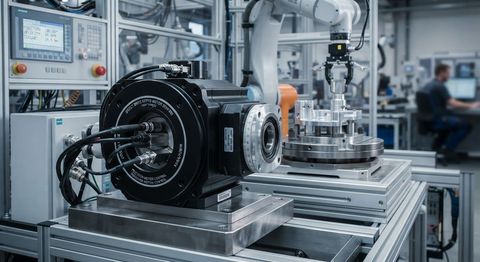
Manufacturing plants use industrial UPS systems to protect automation equipment, monitoring devices, and production control systems from sudden power interruptions.
Important Factors to Consider
Several factors should be evaluated before selecting a UPS system.
- Required power capacity
- Expected backup runtime
- Battery technology
- Installation environment
- Energy efficiency
- Automatic voltage regulation
- Future expansion requirements
- Maintenance needs
- Cooling requirements
- Overall reliability
Common Challenges and Easy Solutions
Battery Aging
Solution: Perform regular inspections and replace batteries at recommended intervals.
Equipment Overload
Solution: Calculate total power requirements before connecting equipment.
Poor Ventilation
Solution: Install the UPS in an area with sufficient airflow.
Unexpected Battery Discharge
Solution: Test the battery periodically and disconnect unnecessary devices during extended outages.
Voltage Instability
Solution: Choose a UPS with automatic voltage regulation for improved power quality.
Future Trends and Industry Insights
UPS technology continues to evolve alongside growing digital infrastructure and increasing energy demands.
Artificial intelligence is improving predictive maintenance by analyzing battery health and identifying potential issues before they affect operation. Intelligent monitoring platforms now provide real-time system information and remote management capabilities.
Lithium-ion battery technology is becoming more common because it provides longer operating life, improved energy density, and reduced maintenance requirements. Modular UPS designs are also gaining popularity because they allow organizations to expand capacity as electrical demands increase.
Future developments are expected to include stronger integration with renewable energy systems, advanced battery management tools, improved energy efficiency, cloud-connected monitoring platforms, and smarter automation that improves reliability across critical power infrastructure.
Key Takeaways
- UPS systems provide uninterrupted electrical power during outages.
- Different UPS categories meet different operational requirements.
- Battery health plays an important role in overall performance.
- Voltage regulation protects sensitive electronic equipment.
- Proper sizing improves efficiency and reliability.
- Regular maintenance extends system lifespan.
- Artificial intelligence and automation are improving UPS management.
- UPS systems remain an essential part of modern electrical infrastructure.
Frequently Asked Questions (FAQ)
What is a UPS system?
A UPS system is an Uninterruptible Power Supply that provides temporary backup electricity during power interruptions while protecting connected equipment.
Why are UPS systems important?
They help prevent unexpected shutdowns, improve power quality, and protect valuable electronic equipment from electrical disturbances.
What is the difference between online and offline UPS systems?
Offline UPS systems switch to battery power during outages, while online UPS systems continuously deliver conditioned electricity through the inverter.
How long does a UPS provide backup power?
Backup duration depends on battery capacity and the amount of connected electrical load.
Can UPS systems regulate voltage?
Yes. Many UPS systems include automatic voltage regulation that stabilizes incoming electrical power.
Where are UPS systems commonly used?
They are widely used in homes, offices, hospitals, educational institutions, communication networks, manufacturing facilities, and data centers.
How often should UPS batteries be checked?
Routine inspections and periodic testing help maintain dependable performance and identify batteries that need replacement.
What is the future of UPS technology?
Future UPS systems are expected to include smarter monitoring, artificial intelligence, improved battery technologies, modular expansion, and stronger integration with renewable energy sources.
Conclusion
UPS systems play a vital role in maintaining reliable electrical power across homes, businesses, healthcare facilities, industrial environments, and digital infrastructure. By providing immediate backup power, regulating voltage, and protecting sensitive equipment, they reduce the impact of unexpected electrical interruptions.
Understanding the different UPS types, core components, operating principles, and maintenance practices helps users make informed decisions based on their specific power requirements. As energy technologies continue to advance, UPS systems will remain an essential part of dependable electrical protection for modern environments.