Generative Video Editing: Complete Guide to AI Video Creation, Editing, and Content Enhancement
Generative video editing is transforming how videos are created, improved, and customized.
Instead of manually editing every scene, creators can use artificial intelligence to automate many editing tasks, generate new visual elements, enhance video quality, and simplify complex production workflows.
Today, generative video editing is used in digital marketing, entertainment, education, social media, filmmaking, corporate communication, healthcare, and many other industries. AI-powered video editing software helps creators produce professional-looking videos with greater efficiency while maintaining creative control.
Whether creating promotional videos, educational content, product demonstrations, training materials, or social media clips, generative AI makes video production faster and more accessible.
This guide explains what generative video editing is, how it works, its major categories, benefits, practical applications, and future developments.
Understanding the Concept
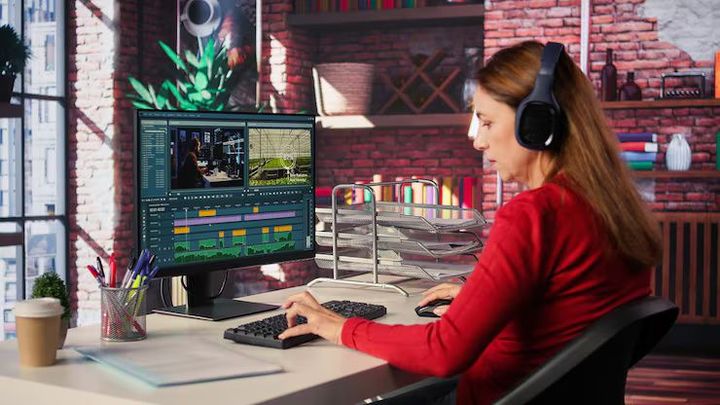
Generative video editing uses artificial intelligence to automatically create, modify, or improve video content based on user instructions.
Unlike traditional editing, which requires manually adjusting every frame, AI analyzes the video, understands objects, scenes, speech, movement, and visual patterns before making intelligent editing decisions.
Modern AI video editing software combines several advanced technologies, including:
- Artificial Intelligence
- Machine Learning
- Computer Vision
- Natural Language Processing
- Generative AI
- Deep Learning
- Video Enhancement Algorithms
These technologies allow editors to create professional videos using simple instructions instead of lengthy manual editing.
For example, a user may request:
- Remove unwanted objects
- Change the video background
- Improve video resolution
- Generate subtitles
- Add realistic visual effects
- Create highlight clips
The AI processes these instructions automatically.
Key Types or Categories
Generative video editing includes several specialized categories.
AI Video Generation
AI creates entirely new video scenes from written descriptions, images, or existing footage.
Common applications include:
- Marketing videos
- Educational presentations
- Product demonstrations
- Training materials
- Social media content
AI Video Enhancement
Video enhancement improves existing footage.
Common improvements include:
- Higher resolution
- Noise reduction
- Better lighting
- Color correction
- Image stabilization
- Frame interpolation
These improvements produce clearer and smoother videos.
AI Object Editing
Artificial intelligence identifies individual objects within video frames.
Users can:
- Remove objects
- Replace backgrounds
- Add new elements
- Modify scenery
- Change weather effects
Object-aware editing greatly simplifies complex visual changes.
AI Avatar Generation
AI avatar technology creates digital presenters capable of speaking multiple languages and delivering scripted content.
Organizations use avatars for:
- Employee training
- Educational videos
- Customer communication
- Product explanations
- Corporate presentations
AI Audio Editing
Generative AI also improves audio quality.
Capabilities include:
- Background noise removal
- Voice enhancement
- Automatic subtitles
- Speech translation
- Audio synchronization
Better audio improves overall viewing experience.
Important Subsections
Computer Vision
Computer vision enables AI to recognize people, objects, faces, backgrounds, and movement within videos.
This allows accurate editing of specific visual elements.
Machine Learning
Machine learning improves editing accuracy over time by learning from large collections of video data.
The AI continuously becomes better at understanding scenes and editing patterns.
Natural Language Editing
Users can edit videos using simple written instructions.
For example:
- "Remove the background."
- "Shorten this scene."
- "Replace the sky with sunset."
- "Create a one-minute summary."
The AI interprets these requests and performs the editing automatically.
Scene Detection
AI automatically divides videos into meaningful scenes.
Editors can quickly locate:
- Interviews
- Outdoor footage
- Product demonstrations
- Action sequences
- Presentations
Scene detection simplifies navigation during editing.
How It Works
Generative video editing follows a structured workflow.
Step 1: Import the Video
Users upload existing footage or provide images, scripts, or prompts.
The AI begins analyzing the content immediately.
Step 2: Analyze Visual Content
Artificial intelligence examines:
- Faces
- Objects
- Motion
- Lighting
- Audio
- Backgrounds
- Camera angles
This creates a detailed understanding of the video.
Step 3: Process User Instructions
Users specify desired edits.
Examples include:
- Remove unwanted objects
- Improve image quality
- Generate captions
- Replace backgrounds
- Create highlight reels
- Add transitions
Natural language processing interprets these requests.
Step 4: Generate Edited Content
The AI creates new frames, adjusts visuals, improves audio, and applies requested modifications while maintaining consistency throughout the video.
Step 5: Review and Export
Editors review the generated results and make additional refinements if necessary before exporting the completed project.
Benefits and Advantages
Generative video editing provides numerous practical advantages.
Faster Production
Artificial intelligence automates repetitive editing tasks, significantly reducing production time.
Improved Video Quality
AI enhancement algorithms improve:
- Resolution
- Lighting
- Sharpness
- Color balance
- Motion stability
Increased Productivity
Editors spend less time on manual adjustments and more time refining creative ideas.
Consistent Results
Automation produces consistent editing styles across multiple projects.
This is especially valuable for businesses creating large amounts of video content.
Lower Learning Curve
Modern AI video editing software allows beginners to create professional-looking videos without advanced editing experience.
Better Accessibility
Automatic subtitles, speech recognition, and language translation help make videos accessible to wider audiences.
Real-World Examples or Applications
Generative video editing supports many industries.
Digital Marketing
Marketing teams create:
- Promotional videos
- Product showcases
- Brand campaigns
- Social media advertisements
AI accelerates content production while maintaining visual quality.
Education
Educational organizations generate:
- Online lessons
- Training videos
- Interactive learning materials
- Tutorial content
Automatic captions improve learning accessibility.
Entertainment
Film and media creators use AI for:
- Visual effects
- Scene enhancement
- Background replacement
- Character animation
These tools support creative storytelling.
Healthcare
Medical organizations produce:
- Patient education videos
- Training materials
- Healthcare awareness campaigns
AI simplifies multilingual communication.
Corporate Communication
Businesses generate:
- Employee onboarding videos
- Internal announcements
- Product demonstrations
- Executive presentations
Automation reduces production effort.
Important Factors to Understand
Several considerations influence successful AI video editing.
Input Quality
Higher-quality source footage generally produces better AI-generated results.
User Review
Although AI performs many tasks automatically, human review remains important for accuracy and creative consistency.
Data Privacy
Organizations should protect sensitive video content during editing workflows and follow applicable privacy regulations.
Ethical Content Creation
AI-generated videos should accurately represent people, events, and information while avoiding misleading visual manipulation.
Hardware Performance
Large video projects often require powerful computers and graphics processing capabilities for efficient rendering.
Future Trends and Industry Insights
Generative video editing continues evolving rapidly.
Real-Time AI Editing
Future AI systems will edit live video streams while recording.
Text-to-Video Generation
Generative AI models continue improving their ability to create realistic videos directly from written descriptions.
Personalized Video Production
Artificial intelligence will automatically customize videos for different audiences based on preferences and viewing behavior.
Intelligent Collaboration
Cloud-based AI editing software will enable multiple creators to collaborate simultaneously on complex video projects.
Advanced Virtual Production
Future production environments will combine generative AI, virtual reality, augmented reality, and real-time rendering to create immersive visual experiences.
Conclusion
Generative video editing represents a major advancement in digital content creation. By combining artificial intelligence, machine learning, computer vision, and natural language processing, modern AI video editing software enables creators to produce professional-quality videos more efficiently than traditional editing methods.
From marketing campaigns and educational content to entertainment, healthcare, and corporate communication, generative AI supports faster production, improved quality, and greater creative flexibility. As AI technology continues advancing, generative video editing will become an increasingly important part of modern digital media creation, helping individuals and organizations produce engaging visual content with greater speed, consistency, and innovation.