Business Process Automation: Discover Workflow Systems, Integration and Operational Efficiency
Business process automation (BPA) uses software, digital workflows and connected business systems to complete repetitive activities with less manual intervention. It helps organisations coordinate tasks, route approvals, exchange information between applications and monitor operational activities through structured processes.
Common examples include automatically processing purchase requests, generating invoices, updating customer records, tracking employee onboarding and sending payment reminders. Instead of relying on separate spreadsheets, email conversations and manual data entry, businesses can connect these activities into a consistent workflow.
BPA can be used by small and medium-sized enterprises as well as large organisations. Its scope ranges from simple approval notifications to complex, multi-department processes involving enterprise resource planning (ERP), customer relationship management (CRM), accounting, human resources and supply chain systems.
The objective is not simply to automate as many tasks as possible. A successful programme improves process consistency, reduces avoidable delays, strengthens oversight and gives employees more time for activities that require judgement and experience.
Why Business Process Automation Matters
Many organisations use several applications to manage daily operations. When those applications do not communicate effectively, employees may need to enter the same information repeatedly, follow up on approvals and manually transfer records between departments.
These disconnected activities can create delays, inconsistent information and difficulty tracking responsibility.
Business process automation addresses these challenges by creating a defined sequence of actions, conditions and approvals.
Key benefits include:
Faster process completion: Routine activities can move between departments without waiting for every step to be handled manually.
Consistent execution: Standard rules help ensure that similar transactions follow the same procedure.
Fewer manual errors: Automated data transfer can reduce mistakes caused by repeated entry and copying.
Improved visibility: Workflow dashboards show pending tasks, completed activities and process bottlenecks.
Stronger accountability: Approval records and activity logs help establish who completed or authorised each step.
Better resource allocation: Employees can spend more time on analysis, customer relationships and complex decisions.
Scalable operations: Standardised workflows can support increasing transaction volumes when the underlying systems are designed appropriately.
Automation does not automatically improve every process. If an organisation automates an inefficient procedure without reviewing it first, the result may simply be a faster version of the same problem.
How Business Process Automation Works
A business workflow defines how information and tasks move from one stage to another. Automation software executes selected activities according to predefined rules, triggers and conditions.
A typical automated workflow follows these stages:
Trigger: An event starts the process, such as a new purchase request, customer enquiry or invoice submission.
Data collection: The system retrieves relevant information from a form, database or connected application.
Validation: Business rules check whether the information is complete and meets required conditions.
Task assignment: The workflow sends the activity to the appropriate employee, team or automated system.
Approval: Authorised individuals review transactions that require human decisions.
Execution: The system performs the permitted action, such as updating a record or generating a document.
Notification: Relevant participants receive status updates or requests for further action.
Record keeping: The system stores workflow history, timestamps and completion information.
Monitoring: Managers review performance indicators and identify opportunities for improvement.
For example, when a department submits a purchase request, an automated workflow can check the department's budget, identify the appropriate approval level, notify the manager and forward the approved request to procurement.
Major Types of Business Process Automation
Different automation methods address different operational requirements. Organisations often combine several technologies rather than relying on a single platform.
| Automation type | Main purpose | Common application |
|---|---|---|
| Workflow automation | Routes tasks and approvals | Purchase approvals |
| Robotic Process Automation (RPA) | Performs repetitive screen-based tasks | Updating legacy systems |
| Business Process Management (BPM) | Designs, manages and improves processes | Enterprise operations |
| API-based automation | Connects applications and transfers information | CRM and ERP integration |
| Document automation | Extracts and processes information from documents | Invoice processing |
| Intelligent automation | Combines AI with workflow execution | Document classification |
| Low-code automation | Builds workflows with visual configuration tools | Departmental approvals |
1. Workflow Automation
Workflow automation manages the movement of tasks between people, departments and applications. It is particularly useful when a process involves multiple approval levels or clearly defined responsibilities.
Examples include employee leave approvals, purchase requisitions, expense reviews and customer enquiry routing.
2. Robotic Process Automation
RPA uses software robots to perform repetitive, rule-based activities through user interfaces or supported system interactions.
For example, a robot may retrieve information from one application, enter it into another and generate a completion report.
RPA can be useful when an older application does not provide a suitable integration interface. However, screen-based automation may require maintenance when application layouts, login procedures or operating rules change.
3. Business Process Management
BPM provides a broader framework for designing, executing, monitoring and improving business processes.
It helps organisations map how work is performed, define responsibilities, establish approval rules and evaluate process performance.
BPM is particularly relevant to organisations managing complex operations across several departments.
4. API-Based Automation
Application programming interfaces (APIs) allow different software platforms to exchange information through defined technical interfaces.
For example, an accounting platform can receive an approved purchase record from an ERP system, while a CRM platform can update customer information after a transaction.
Where reliable APIs are available, direct integration is generally preferable to fragile screen-based automation.
5. AI-Assisted Automation
Artificial intelligence can support activities that involve unstructured information, document interpretation, classification or language-based interactions.
Examples include extracting invoice details, categorising incoming emails, identifying unusual transaction patterns and summarising documents.
AI-generated results should be validated before they trigger significant financial, legal or operational actions. Human review remains important when information is incomplete, ambiguous or high-risk.
Business Processes That Can Be Automated
Automation opportunities exist across finance, human resources, procurement, customer management, IT and supply chain operations.
Finance and Accounting
Finance departments often handle large volumes of structured transactions, making them suitable for carefully controlled automation.
Common applications include:
Invoice receipt and data extraction
Purchase order matching
Expense claim processing
Payment approval routing
Bank reconciliation support
Financial report preparation
Tax documentation workflows
Accounts receivable reminders
For example, an invoice workflow can capture supplier details, compare the invoice with a purchase order and goods receipt, flag mismatches and route the document for approval.
Human Resources
HR automation can standardise employee-related administrative processes.
Typical applications include:
Employee onboarding
Document collection and verification
Leave and attendance approvals
Payroll input validation
Training registration
Employee record updates
Exit formalities
A structured onboarding workflow can notify IT, HR, finance and the reporting manager when a new employee joins, ensuring that each department completes its assigned activities.
Sales and Customer Management
CRM-connected workflows help sales teams manage customer information and follow-up activities.
Examples include:
Lead assignment based on territory or category
Customer enquiry routing
Follow-up reminders
Proposal approval
Customer record updates
Sales pipeline notifications
Contract review tracking
Automation can improve process visibility, but customer communication should still reflect the actual situation and avoid sending inaccurate or unnecessary messages.
Procurement and Supply Chain
Procurement workflows coordinate purchasing activities and supplier interactions.
Common applications include:
Purchase requisition submission
Vendor onboarding
Supplier document verification
Purchase order generation
Inventory threshold alerts
Goods receipt confirmation
Contract renewal reminders
Delivery status notifications
When connected with inventory and accounting platforms, these workflows can reduce information gaps between purchasing, warehouse and finance teams.
IT and Operations
IT teams can automate routine administrative and technical processes.
Examples include:
User access requests
Password reset workflows
Software approval routing
Incident ticket assignment
System health notifications
Backup status reporting
Infrastructure provisioning
Change management approvals
Security-sensitive activities should use appropriate permissions, verification and approval requirements.
Workflow Systems and Automation Platforms
A workflow system provides the environment for creating, executing and monitoring automated processes. The right platform depends on the organisation's existing applications, technical capacity, security requirements and process complexity.
Examples of widely used platforms include:
| Platform | General capabilities | Common suitability |
|---|---|---|
| Microsoft Power Automate | Cloud workflows, desktop RPA and application connectors | Microsoft 365 and connected business applications |
| SAP Business Technology Platform | Enterprise integration, process automation and orchestration | SAP-centred enterprise environments |
| UiPath | RPA, document processing and automation orchestration | Repetitive and complex enterprise tasks |
| ServiceNow | IT workflows and enterprise process management | IT operations and internal workflows |
| Zoho Flow | Application integration and workflow automation | Organisations using connected business applications |
| Kissflow | Visual workflow design and process management | Departmental and business approval workflows |
| Make | Visual integration and multi-step automation | Connected applications and operational workflows |
Platform capabilities, licensing models, integration limits and regional availability can change. Organisations should evaluate current product documentation and conduct a practical assessment before selecting a system.
System Integration: Connecting Business Applications
Integration is one of the most important parts of business process automation. A workflow may be well designed, but its effectiveness is limited if information cannot move reliably between the applications involved.
A typical enterprise environment may include:
ERP for financial and operational records
CRM for customer and sales information
HRMS for employee administration
Accounting software for transactions and reporting
Inventory systems for stock management
Payment gateways and banking platforms
Document management systems
Email and collaboration applications
Business intelligence tools
These systems can be connected using several methods.
API Integration
APIs allow applications to exchange structured information through authorised requests. They are commonly used for connecting ERP, CRM, payment, accounting and other enterprise platforms.
Webhooks
Webhooks send notifications when a particular event occurs. For example, a payment platform may notify an accounting application when a transaction reaches a defined status.
Prebuilt Connectors
Many automation platforms provide connectors for commonly used applications. These can simplify integration and reduce the amount of custom development required.
Database Integration
Some organisations connect applications through controlled database access or data pipelines. This approach requires careful attention to permissions, data consistency and system performance.
RPA-Based Integration
RPA can interact with application screens when direct integration is unavailable. It may be useful for older systems, although it can be more sensitive to interface changes.
Integration best practice: Use supported APIs or reliable connectors wherever practical. Use RPA for suitable tasks where better integration options are unavailable, and monitor it for changes that may interrupt execution.
Choosing the Right Automation Technology
Not every process needs the same technology. A simple approval workflow may not require an enterprise RPA platform, while a complex transaction process may need several systems working together.
| Business requirement | Suitable approach | Important consideration |
|---|---|---|
| Routine approvals | Workflow automation | Approval hierarchy and escalation |
| Repetitive screen-based entry | RPA | Application interface stability |
| Application data exchange | API integration | Authentication and data mapping |
| Complex enterprise processes | BPM platform | Process ownership and governance |
| Invoice and document handling | Document automation | Extraction accuracy and human review |
| Unstructured information analysis | AI-assisted workflow | Validation and error handling |
| Cross-department operations | Enterprise orchestration | Central monitoring and access control |
A practical selection process should consider integration compatibility, ease of administration, audit records, data protection, scalability, support arrangements and the skills available within the organisation.
Steps to Implement Business Process Automation
A structured implementation approach helps organisations avoid unnecessary complexity and focus on processes that can produce measurable improvements.
1. Identify Repetitive Activities
Start by reviewing activities that involve frequent data entry, repeated approvals, document handling or routine communication.
Speak with employees who perform the work. They can often identify delays and exceptions that are not visible in management reports.
2. Map the Existing Process
Document each step, responsible person, application, approval condition and possible exception.
A process map should show:
Where the activity begins
What information is required
Who performs each task
Which approvals are necessary
Where delays occur
How errors and exceptions are handled
What confirms successful completion
3. Prioritise Suitable Processes
Evaluate each process based on transaction volume, time spent, error frequency, complexity, business importance and automation feasibility.
Processes with clear rules, stable inputs and predictable outcomes are often suitable starting points.
4. Simplify Before Automating
Remove unnecessary approvals, duplicate data entry and outdated steps where appropriate.
This is important because automation should support a well-designed process rather than preserve avoidable complexity.
5. Select the Platform
Compare workflow systems and integration technologies against the organisation's requirements.
Check whether the platform supports required applications, approval structures, monitoring, security controls and future expansion.
6. Design the Workflow
Define triggers, conditions, task assignments, permissions, notifications and exception routes.
Include clear rules for what happens when data is missing, an approval is rejected or an integrated system becomes unavailable.
7. Test With Realistic Scenarios
Test normal transactions as well as unusual cases. Verify that records are updated correctly, approvals reach the right people and failures are reported.
A pilot involving one department or process can reveal problems before wider deployment.
8. Train Employees and Launch
Explain how the automated process works, which activities still require human decisions and how users can report problems.
Launch in stages when the workflow affects important financial or operational activities.
9. Monitor and Improve
Review completion time, failure rates, exception volumes and user feedback. Update workflows when business rules or connected applications change.
Measuring Operational Efficiency and Automation Performance
Automation should be evaluated through measurable business outcomes rather than the number of workflows created.
Useful performance indicators include:
| KPI | What it measures |
|---|---|
| Process cycle time | Time required to complete a process |
| First-time completion rate | Percentage completed without correction or rework |
| Manual intervention rate | Frequency of employee involvement |
| Workflow failure rate | Percentage of runs that fail |
| Exception rate | Transactions requiring additional review |
| Approval turnaround time | Time taken for required decisions |
| Cost per transaction | Average operational expense for each transaction |
| Automation coverage | Share of eligible activities handled through automation |
| Employee productivity | Output relative to time or resources used |
| SLA compliance | Percentage of activities completed within agreed timelines |
A simple efficiency calculation can help establish a baseline.
Illustrative example:
Suppose a finance team processes 2,000 invoices each month. Manual processing takes an average of 12 minutes per invoice.
Monthly manual processing time: 24,000 minutes
Equivalent processing time: 400 hours
If automation reduces average employee handling to 4 minutes per invoice, the remaining handling time becomes 133.3 hours.
The illustrative difference is approximately 266.7 hours per month.
This is a theoretical time comparison, not a guaranteed saving. Actual results depend on exception rates, validation requirements, implementation effort, system performance and ongoing supervision.
Risks and Challenges in Business Process Automation
Automation can improve consistency, but poorly controlled workflows can create new operational and security risks.
Integration failures: Changes in APIs, credentials or application configurations can interrupt workflows. Use monitoring, error alerts and documented recovery procedures.
Incorrect data: Poor-quality source information can move quickly through an automated process. Apply validation rules and exception handling before records are updated.
Excessive automation: Automating every activity can create unnecessary complexity. Prioritise processes where automation has a clear operational purpose.
Security exposure: Automation accounts may have access to sensitive business records. Apply least-privilege permissions, secure credential storage and periodic access reviews.
Limited employee adoption: Employees may continue using manual workarounds if workflows are difficult to understand. Provide training and involve process owners during design.
Vendor dependency: A business may become reliant on a particular platform or integration provider. Review data portability, contractual terms and exit arrangements.
Uncontrolled changes: A small workflow modification can affect downstream departments. Use change approvals, version control and testing before deployment.
AI-related errors: AI-assisted processes may produce incorrect classifications or summaries. Use confidence thresholds, human review and restrictions on high-impact automated decisions.
Security, Governance and Compliance Considerations in India
Business process automation often involves personal information, financial records, employee details, customer data and confidential company documents. Organisations should establish controls before connecting systems or granting automated accounts access to information.
Important considerations include:
Digital Personal Data Protection Act, 2023: Organisations processing digital personal data should assess applicable obligations relating to lawful processing, security safeguards, individual rights and accountability.
Digital Personal Data Protection Rules, 2025: The Rules were notified on 14 November 2025. The accompanying commencement notification establishes a phased implementation schedule, so organisations should check which provisions apply at the relevant time rather than assuming every requirement commenced on the notification date.
Information Technology Act, 2000: Relevant provisions may apply to electronic records, unauthorised access and information security matters.
CERT-In Directions: The directions issued on 28 April 2022 address specified cybersecurity practices, incident reporting and log retention requirements for covered entities.
Sector-specific requirements: Banks, financial institutions, insurance businesses, healthcare organisations and other regulated entities may have additional obligations relating to records, access, outsourcing, audits and operational resilience.
Good governance practices include assigning process owners, maintaining an inventory of automated workflows, limiting system permissions, recording important actions, reviewing vendor access and testing recovery procedures.
Compliance responsibilities depend on the organisation, the type of information processed, the industry and the applicable commencement dates and rules. Automation software does not by itself make a business compliant.
Future Trends in Business Process Automation
Business process automation is moving beyond simple rule-based task execution towards connected, intelligent and centrally managed operations.
AI-assisted workflow design: AI tools can help identify process patterns, suggest workflow improvements and support document interpretation.
Hyperautomation: Organisations are combining RPA, APIs, workflow management, analytics and AI to coordinate broader business processes.
Process mining: Process mining tools analyse system records to identify bottlenecks, repeated activities and differences between documented procedures and actual operations.
Intelligent document processing: AI-assisted extraction can help process invoices, forms, contracts and other documents with varied layouts.
Cloud-based orchestration: Cloud platforms make it possible to manage workflows across distributed applications and teams, subject to appropriate security and governance controls.
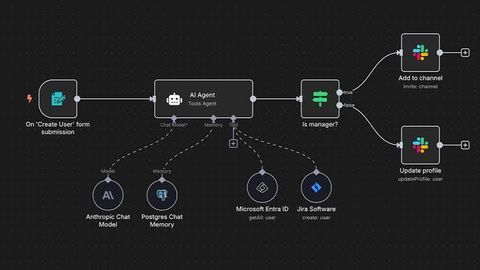
Agentic automation: AI agents may perform multi-step activities using connected tools. These systems require carefully limited permissions, approval checkpoints, transaction controls and monitoring, especially when actions affect financial or personal records.
The long-term direction is likely to involve more connected workflows, but reliable integration, human oversight and clear accountability will remain essential.
Tools and Resources for Business Process Automation
Organisations can use official product documentation and technical resources to understand platform capabilities and integration requirements.
Microsoft Power Automate: Workflow automation, desktop RPA, application connectors and process monitoring.
SAP Business Technology Platform: Enterprise integration, process orchestration and automation across SAP and third-party applications.
UiPath: RPA, document processing and automation management.
ServiceNow: IT and enterprise workflow management.
Zoho Flow: Application connections and multi-step business workflows.
CERT-In: Cybersecurity directions, advisories and security guidance relevant to covered organisations.
MeitY: Official information on India's data protection framework and related notifications.
Before deployment, review platform documentation, security arrangements, integration limits, data location considerations and applicable contractual terms.
Frequently Asked Questions
1. What is business process automation?
Business process automation uses software and connected systems to perform or coordinate repetitive business activities. It can manage approvals, document processing, data transfer, notifications and other structured workflows.
2. What is the difference between BPA and RPA?
BPA focuses on improving and automating broader business processes, while RPA uses software robots to perform specific repetitive tasks. RPA can form one part of a wider BPA programme.
3. Which business processes should be automated first?
Processes with high transaction volumes, repetitive steps, clear rules and measurable delays are often suitable starting points. Invoice processing, employee onboarding, purchase approvals and customer enquiry routing are common examples.
4. Can business process automation integrate with ERP and CRM systems?
Yes. Automation platforms can connect with ERP and CRM applications through APIs, webhooks, prebuilt connectors, databases or RPA. The most appropriate method depends on the applications and their integration capabilities.
5. Is business process automation suitable for small businesses?
Yes. Smaller organisations can begin with straightforward workflows such as invoice approvals, lead assignment, employee records and document routing. The platform should match the organisation's process complexity, technical capacity and security needs.
Conclusion
Business process automation helps organisations create more consistent and connected operations by reducing repetitive manual activities and coordinating work across departments. Workflow systems, APIs, RPA, BPM and AI-assisted tools each contribute to different parts of the automation process.
Successful implementation begins with understanding existing operations, simplifying processes and selecting suitable technology. Businesses should also establish clear ownership, secure integrations, test exception handling and measure results through practical performance indicators.
As automation capabilities continue to develop, organisations that combine reliable workflows with appropriate human oversight and governance will be better positioned to improve operational efficiency and manage increasingly complex business processes.