Jump to a Chapter

Gaming PCs Explained: Components, Performance, Graphics Cards, Cooling & Buying Guide

Gaming PCs Explained: Components, Performance, Graphics Cards, Cooling & Buying Guide

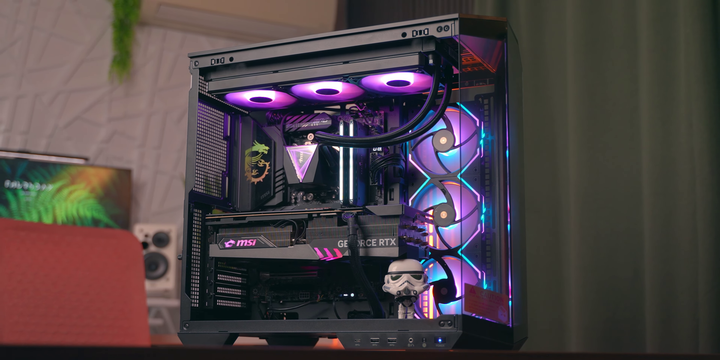
Gaming PCs are purpose-built computers designed to deliver smooth gameplay, high frame rates, detailed graphics, and responsive performance across modern video games and creative applications. Unlike standard desktop computers, gaming PCs typically include powerful processors, dedicated graphics cards, high-speed memory, advanced cooling systems, and upgrade-friendly hardware.

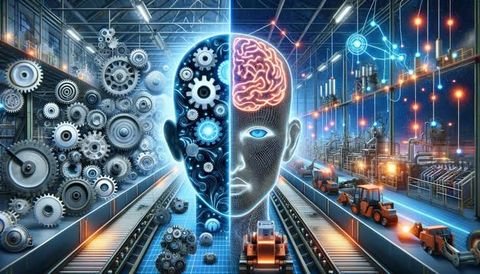
Modern gaming systems also benefit from artificial intelligence (AI), ray tracing, high-refresh-rate displays, PCIe Gen 5 storage, DDR5 memory, and intelligent performance optimization. These technologies enhance gaming experiences while supporting demanding tasks such as video editing, 3D rendering, game development, streaming, and content creation.

This guide explains gaming PC components, performance factors, graphics technology, cooling solutions, display options, and important considerations when selecting a gaming computer from an educational perspective. It does not provide purchasing, financial, repair, or technical support advice.

What Is a Gaming PC?

A gaming PC is a desktop computer built with hardware capable of running graphically demanding software and modern games efficiently.

A typical gaming PC includes:

  • Central Processing Unit (CPU)
  • Graphics Processing Unit (GPU)
  • Motherboard
  • Random Access Memory (RAM)
  • Storage drives
  • Power Supply Unit (PSU)
  • Cooling system
  • Computer case

Each component contributes to overall system performance.

Why Gaming PCs Are Popular

Gaming PCs offer flexibility beyond gaming.

Common uses include:

  • Video games
  • Live streaming
  • Video editing
  • 3D design
  • Animation
  • Software development
  • Artificial intelligence projects
  • Digital content creation

Their upgradeable design also allows users to improve performance over time.

Central Processing Unit (CPU)

The CPU manages instructions and coordinates system operations.

Important CPU characteristics include:

  • Core count
  • Thread count
  • Clock speed
  • Cache memory
  • Power efficiency
  • Integrated technologies
  • Multi-core performance
  • Platform compatibility

A balanced processor helps support gaming and multitasking performance.

Graphics Processing Unit (GPU)

The graphics card is one of the most important components in a gaming PC.

Its primary functions include:

  • Rendering graphics
  • Ray tracing
  • AI-assisted image processing
  • High-resolution gaming
  • Video acceleration
  • 3D rendering
  • Creative workloads
  • Multi-monitor support

GPU performance significantly influences gaming quality and frame rates.

Motherboard

The motherboard connects all internal hardware components.

Common features include:

  • CPU socket
  • Memory slots
  • PCI Express expansion slots
  • Storage connectors
  • USB connectivity
  • Network interfaces
  • Audio components
  • BIOS or UEFI firmware

Motherboard compatibility determines which components can be installed.

Memory (RAM)

RAM temporarily stores active data used by applications.

Important characteristics include:

  • Memory capacity
  • Speed
  • DDR generation
  • Dual-channel support
  • Expandability
  • Latency
  • Stability
  • Energy efficiency

Adequate memory improves multitasking and application responsiveness.

Storage Options

Gaming PCs commonly use multiple storage technologies.

Examples include:

  • SATA SSD
  • NVMe SSD
  • PCIe Gen 4 SSD
  • PCIe Gen 5 SSD
  • Hard Disk Drives (HDD)
  • External storage
  • Cloud storage
  • Backup drives

Solid-state drives generally provide faster loading times than traditional hard drives.

Cooling Systems

Effective cooling helps maintain stable system performance.

Common cooling solutions include:

  • Air cooling
  • Liquid cooling
  • All-in-one (AIO) liquid coolers
  • Case fans
  • Heat sinks
  • Thermal paste
  • Smart fan control
  • Airflow optimization

Cooling requirements depend on system configuration and workload.

Power Supply Unit (PSU)

The PSU delivers electrical power to all components.

Important considerations include:

  • Wattage
  • Efficiency ratings
  • Modular cabling
  • Voltage stability
  • Safety protections
  • Expansion capability
  • Cooling design
  • Reliability

Choosing an appropriately rated PSU supports long-term system stability.

Gaming Monitors

Display quality has a major impact on gaming.

Common monitor features include:

  • Full HD, QHD, and 4K resolutions
  • High refresh rates
  • Fast response times
  • HDR support
  • Adaptive synchronization
  • Wide color coverage
  • IPS, VA, or OLED panels
  • Adjustable stands

Monitor selection should complement the capabilities of the graphics card.

Artificial Intelligence in Gaming PCs

AI technologies are increasingly integrated into gaming hardware.

Applications include:

  • AI-powered image upscaling
  • Intelligent frame generation
  • Performance optimization
  • Background noise reduction
  • Streaming enhancements
  • Power management
  • Game optimization
  • Predictive system tuning

AI improves visual quality and overall system efficiency.

Connectivity

Modern gaming PCs support various connectivity options.

Examples include:

  • USB Type-A
  • USB Type-C
  • HDMI
  • DisplayPort
  • Ethernet
  • Wi-Fi
  • Bluetooth
  • Audio ports

Connectivity requirements depend on the user's peripherals and workflow.

Expandability

One advantage of gaming PCs is their modular design.

Users can often upgrade:

  • Graphics cards
  • Memory
  • Storage
  • Cooling systems
  • Power supplies
  • Expansion cards
  • Networking hardware
  • Peripheral devices

Upgrade compatibility depends on the motherboard, case, and power supply.

Maintenance Practices

Regular maintenance helps ensure reliable operation.

Recommended practices include:

  • Cleaning dust filters
  • Removing internal dust
  • Updating drivers
  • Updating firmware
  • Monitoring temperatures
  • Organizing cables
  • Checking storage health
  • Reviewing software updates

Routine maintenance contributes to long-term system performance.

Choosing a Gaming PC

When evaluating a gaming PC, users commonly consider:

  • Processor performance
  • Graphics capability
  • Memory capacity
  • Storage speed
  • Cooling efficiency
  • Power supply quality
  • Upgrade potential
  • Budget and intended use

The ideal configuration depends on gaming preferences and additional workloads.

Emerging Trends in 2026

Gaming hardware continues evolving rapidly.

Current developments include:

  • AI-powered gaming optimization
  • Advanced ray tracing technologies
  • PCIe Gen 5 storage
  • DDR5 memory improvements
  • Energy-efficient processors
  • Cloud gaming integration
  • Intelligent cooling systems
  • Sustainable hardware designs

These innovations continue improving gaming performance and user experience.

Frequently Asked Questions

What is the most important component in a gaming PC?

Both the CPU and GPU are important, but the graphics card generally has the greatest impact on gaming performance, especially at higher resolutions and graphical settings.

Why is cooling important?

Effective cooling helps maintain stable operating temperatures, reducing the risk of thermal throttling and supporting long-term hardware reliability.

Is SSD storage better for gaming?

Solid-state drives generally provide faster game loading times, quicker system startup, and improved responsiveness compared with traditional hard disk drives.

Can gaming PCs be upgraded?

Yes. Many gaming PCs allow upgrades to components such as graphics cards, memory, storage, cooling systems, and power supplies, depending on hardware compatibility.

How is AI improving gaming PCs?

AI assists with image enhancement, frame generation, performance optimization, intelligent cooling, streaming quality, and overall system efficiency.

Conclusion

Gaming PCs combine powerful processors, advanced graphics cards, high-speed memory, fast storage, and efficient cooling systems to deliver exceptional gaming and creative computing performance. Beyond gaming, these systems support demanding applications such as video editing, 3D rendering, software development, and AI workloads.

As artificial intelligence, ray tracing, high-speed storage, and energy-efficient hardware continue advancing, gaming PCs are expected to become increasingly powerful, intelligent, and adaptable. Understanding the role of each component, performance considerations, cooling technologies, and future trends helps users make informed decisions when selecting or upgrading a gaming computer.

Disclaimer

This article is intended solely for informational and educational purposes. It does not provide purchasing, financial, repair, technical support, or professional hardware advice. It does not endorse, recommend, compare, rank, review, market, or promote any computer manufacturer, graphics card brand, processor vendor, component supplier, retailer, or gaming hardware company. Hardware specifications, compatibility, performance, software features, pricing, and availability vary by manufacturer, model, and region. Readers should consult official product documentation and qualified professionals before purchasing, assembling, upgrading, or servicing a gaming PC.

author-image

Ravi Shankar Maurya

We create purposeful content that speaks, resonates, and drives action.

August 03, 2026 . 7 min read