Jump to a Chapter

Clicks Power Keyboard Explained: Physical Keys, Wireless Charging, Features & Smartphone Compatibility

Clicks Power Keyboard Explained: Physical Keys, Wireless Charging, Features & Smartphone Compatibility

Smartphones have become powerful productivity tools, but typing long messages, emails, notes, and documents on a touchscreen can still feel different from using physical keys. The Clicks Power Keyboard is designed around this idea, combining a physical smartphone keyboard with additional power-related functionality.


The device represents a growing category of smartphone accessories that aim to improve mobile typing while adding practical features such as battery support, device protection, and connectivity. Its design is particularly relevant for users who prefer tactile feedback when writing on a smartphone.

This guide explains the Clicks Power Keyboard, its physical-key design, charging concept, compatibility considerations, connectivity, productivity features, and smartphone integration from an educational perspective.

What Is the Clicks Power Keyboard?

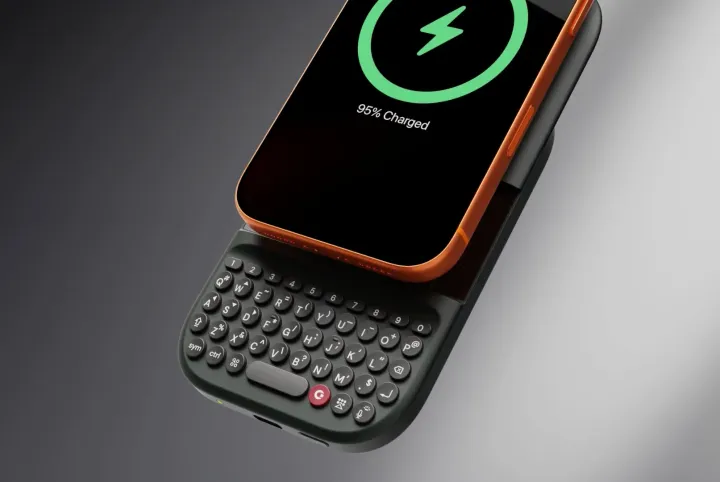
The Clicks Power Keyboard is a smartphone accessory that combines a physical QWERTY keyboard with additional battery functionality.

Rather than replacing the smartphone's touchscreen, the keyboard works alongside it. Users can continue interacting with the phone's display while using physical keys for text input.

Its design focuses on:

  • Physical typing
  • Mobile productivity
  • Smartphone integration
  • Battery support
  • Tactile feedback
  • Portable use

The exact functionality depends on the compatible smartphone model and keyboard configuration.

Physical Keyboard Design

The defining feature is the integrated physical QWERTY keyboard.

Physical keys provide tactile feedback that differs from touchscreen typing.

Potential advantages include:

  • Tactile key presses
  • Dedicated letter keys
  • Improved typing familiarity
  • Reduced reliance on virtual keyboards
  • Keyboard shortcuts
  • More direct text entry

For users who frequently compose longer messages or documents, physical keys can provide a different typing experience from a touchscreen.

How the Keyboard Works

The keyboard is designed to integrate directly with a compatible smartphone.

A typical interaction involves:

  1. The smartphone is placed into the keyboard accessory.
  2. The keyboard connects with the phone through its supported interface.
  3. Physical key presses are interpreted as text input.
  4. The smartphone's display remains available for applications and navigation.
  5. Additional keyboard functions can be accessed through dedicated keys or shortcuts.

This creates a hybrid experience combining physical controls with smartphone software.

Wireless Charging and Power Features

Power functionality is an important part of the Clicks Power Keyboard concept.

Depending on the configuration and compatible device, power-related features can help address battery requirements while using the accessory.

Wireless charging technology generally transfers electrical energy between compatible charging components without requiring a physical charging connector between them.

Important concepts include:

  • Charging alignment
  • Power efficiency
  • Heat management
  • Charging speed
  • Battery capacity
  • Device compatibility

Actual charging performance depends on the specific hardware and charging standards involved.

Battery Support

A keyboard accessory with an integrated battery can provide additional power to a connected smartphone.

This can be useful during:

  • Extended typing sessions
  • Travel
  • Mobile work
  • Long communication sessions
  • Navigation
  • Productivity tasks

Battery performance depends on factors such as smartphone usage, wireless connectivity, display brightness, network activity, and the accessory's battery capacity.

Smartphone Compatibility

Compatibility is one of the most important considerations with smartphone keyboard accessories.

Users should check:

  • Smartphone model
  • Device dimensions
  • Operating-system version
  • Physical connector compatibility
  • Keyboard software support
  • Charging compatibility
  • Accessory-specific requirements

A keyboard designed for one smartphone generation may not necessarily fit another model.

Smartphone Integration

Physical keyboard accessories can interact with smartphone software in several ways.

Possible integrations include:

  • Text input
  • Keyboard shortcuts
  • Application navigation
  • Cursor movement
  • Search commands
  • Productivity controls
  • System navigation

The exact functions depend on the smartphone operating system and accessory software.

Keyboard Shortcuts

Physical keyboards can provide shortcuts that are difficult or less intuitive to reproduce on a touchscreen.

Examples may include:

  • Cursor navigation
  • Text selection
  • Copy and paste
  • Application switching
  • Search activation
  • Home-screen navigation

Shortcut availability depends on the device and operating system.

Productivity Applications

A physical keyboard can be useful for a variety of mobile tasks.

These may include:

  • Email composition
  • Note-taking
  • Messaging
  • Document editing
  • Social media writing
  • Research
  • Content drafting
  • Mobile work

The main advantage is the tactile typing experience rather than replacing the smartphone's existing software.

Physical Keys vs Touchscreen Typing

The two approaches provide different experiences.

FeaturePhysical KeyboardTouchscreen Keyboard
Tactile feedbackStrongLimited
Screen spaceMore availableKeyboard occupies part of display
Typing feelMechanical/tactileVirtual
ShortcutsDedicated physical controlsSoftware-dependent
FlexibilityHardware-basedHighly customizable
Learning curveFamiliar for physical-key usersFamiliar for smartphone users

The preferred approach depends largely on individual typing habits.

Design and Portability

Smartphone keyboard accessories add physical components to a device that is normally designed around a thin touchscreen form factor.

Important design considerations include:

  • Overall thickness
  • Weight
  • Key spacing
  • Device protection
  • Grip
  • Portability
  • Ergonomics

A well-designed accessory attempts to balance typing comfort with smartphone portability.

Connectivity

Modern smartphone accessories can use different methods of communication with mobile devices.

Potential technologies include:

  • USB-C
  • Bluetooth
  • Wireless protocols
  • Proprietary device interfaces

The connection method affects power consumption, latency, reliability, and compatibility.

Charging Considerations

When using a smartphone keyboard accessory with power functionality, several factors can affect charging performance.

These include:

  • Charger compatibility
  • Power output
  • Charging alignment
  • Battery temperature
  • Smartphone battery condition
  • Simultaneous device usage
  • Environmental temperature

For accurate specifications, users should refer to the manufacturer's technical documentation.

Software Support

Hardware accessories often depend on operating-system support for their full functionality.

Software compatibility can affect:

  • Keyboard shortcuts
  • Key mapping
  • System navigation
  • Application behavior
  • Charging indicators
  • Firmware updates

Keeping compatible software and firmware updated can help maintain functionality.

Advantages of a Physical Smartphone Keyboard

Physical smartphone keyboards can provide several potential benefits.

These include:

  • Tactile typing
  • Dedicated keys
  • More screen visibility while typing
  • Physical shortcuts
  • Familiar typing experience
  • Improved long-form text interaction

These advantages are particularly relevant to users who prefer traditional keyboards.

Considerations Before Using a Keyboard Accessory

Users should consider several factors.

Device Compatibility

Verify that the smartphone model is supported.

Keyboard Layout

Check key arrangement, spacing, and language support.

Battery Features

Understand how charging and battery functionality operate.

Size and Weight

Consider whether the additional hardware affects portability.

Software Support

Check operating-system and firmware requirements.

Application Compatibility

Some keyboard functions may behave differently across applications.

Modern Trends in Smartphone Keyboards

Physical smartphone keyboards remain a niche category, but the concept connects with broader mobile technology trends.

Current developments include:

  • Modular smartphone accessories
  • Mobile productivity hardware
  • AI-assisted typing
  • Context-aware shortcuts
  • Advanced mobile connectivity
  • Integrated charging
  • Compact ergonomic designs

These technologies demonstrate how smartphone accessories continue evolving beyond basic protective cases.

Future of Physical Smartphone Accessories

Future accessories may combine physical controls with increasingly intelligent software.

Potential developments include:

  • AI-assisted typing
  • Adaptive shortcut systems
  • Personalized key functions
  • Improved charging efficiency
  • Smart battery management
  • Enhanced device integration
  • Modular accessory ecosystems

These developments could create more flexible mobile computing experiences.

Frequently Asked Questions

What is the Clicks Power Keyboard?

The Clicks Power Keyboard is a smartphone accessory designed to provide physical QWERTY keys alongside additional power-related functionality for compatible smartphones.

Why use a physical smartphone keyboard?

Physical keyboards provide tactile feedback and dedicated keys, which some users may find useful for longer messages, emails, notes, and other text-heavy tasks.

Does the Clicks Power Keyboard work with every smartphone?

No. Smartphone accessories typically support specific device models and operating-system configurations. Compatibility should be verified before use.

Does a keyboard accessory affect smartphone portability?

Adding a physical keyboard increases the overall size and weight of a smartphone compared with using the phone alone.

Can physical smartphone keyboards improve productivity?

They can provide a tactile typing experience and dedicated shortcuts that may make certain text-heavy tasks more comfortable for users accustomed to physical keyboards.

Conclusion

The Clicks Power Keyboard represents a different approach to smartphone interaction by bringing physical QWERTY keys into a mobile environment while incorporating power-related functionality. Its concept combines traditional typing with the flexibility of modern smartphone software.

For users who prefer tactile controls, physical keys can provide a familiar alternative to touchscreen typing, particularly for messaging, note-taking, email composition, and other text-intensive activities. However, compatibility, dimensions, charging behavior, software support, and smartphone model requirements are important considerations.

As mobile computing continues evolving, accessories such as physical keyboards demonstrate how smartphones can be adapted for different productivity preferences. Future developments may further combine tactile hardware, intelligent software, AI-assisted typing, and advanced power management into increasingly integrated mobile experiences.

Disclaimer

This article is intended solely for informational and educational purposes. It does not provide purchasing, technical support, or professional technology advice. It does not endorse, recommend, compare, rank, review, market, or promote Clicks, its products, or any other smartphone accessory manufacturer. Features, compatibility, charging capabilities, dimensions, software support, and availability may vary by product version, smartphone model, operating-system version, and region. Readers should consult official manufacturer documentation for current specifications and compatibility information.

author-image

Ravi Shankar Maurya

We create purposeful content that speaks, resonates, and drives action.

August 11, 2026 . 8 min read